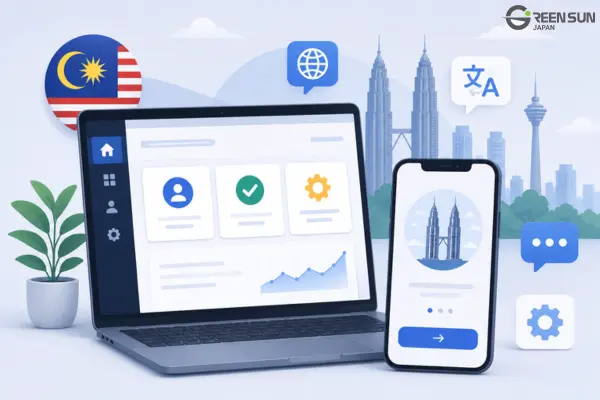
An app can be translated accurately and still confuse users in Malaysia if buttons are too long, error messages do not tell users what to do next, or feature names change between onboarding and account settings. That is why Malaysian software localization needs to address not only language, but also the user interface, user flows, and locale-specific data.
This article uses a hypothetical e-commerce app to show how localization should handle UI strings, error messages, onboarding, account settings, help center content, and data formatting before release.
In this article, “Malaysian software localization” refers to adapting software for users in Malaysia. This includes Malay-language localization as well as locale-specific requirements such as currency, dates, numbers, and other regional conventions.
Key Takeaways
- What Malaysian software localization involves: Localization for Malaysia goes beyond translating content into Malay. It also includes adapting UI behavior, terminology, UX, and locale-specific formats for users in Malaysia.
- Better UI strings and error messages: Translators need enough context to understand what each string does. Error messages should also tell users what action to take next.
- Consistent terminology across every touchpoint: A Glossary should keep feature names consistent across the App ➔ Onboarding ➔ Account Settings ➔ Push Notifications/Email ➔ Help Center.
- L10n QA on the actual localized build: Localization QA should be performed on a staging, test, or release-candidate build to identify text overflow, truncation, placeholder issues, and locale-formatting errors before release.
1. Define the Scope Across the Entire User Journey
The localization scope should include everything users can see or interact with. Malay software localization is not limited to menus and buttons. It should also cover empty states, tooltips, dialog boxes, push notifications, emails, account settings, and help center content.
In this use case, the localization scope follows the user journey from account registration through order tracking and support requests.
The project team should review each step, including:
- Opening the app
- Creating an account
- Searching for products
- Completing checkout
- Receiving notifications
- Contacting customer support
Each string should include an ID, screen name, character limit, placeholder information, reference image, and functional notes.
Context is critical because the same word can have different meanings depending on its function. It also helps the design team identify areas where the UI needs to expand or adjust.
A standalone string may be translated correctly from a linguistic standpoint but still be wrong for the actual function it performs.
2. Adapt UI Strings and Error Messages Around User Actions
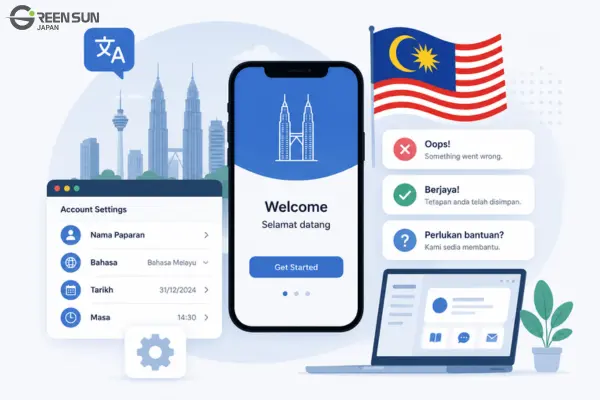
UI text should make it clear what users can do, while error messages should explain both the problem and the next step. In software translation in Malaysia, wording should be concise without sacrificing clarity.
| Source string (English) | Before – Literal translation | After – UX-appropriate version | UX benefit |
|---|---|---|---|
| Something went wrong | Sesuatu telah berlaku | Ralat berlaku. Cuba lagi. | Clearly identifies an error and gives users a next action: “Try again.” |
| Your session has expired | Sesi anda telah luput | Sesi anda telah tamat. Sila log masuk semula. | Gives users a clear solution: log in again. |
| Save changes | Selamatkan perubahan | Simpan perubahan | Uses the correct functional term. “Simpan” means “Save,” while “Selamatkan” is closer to “rescue” or “save a life.” |
Practical UI Examples
- At checkout: Instead of displaying only “Invalid information,” the app should specify whether the email address, shipping address, or phone number is invalid.
- When a login session expires: The message should tell the user to log in again instead of showing only a generic error.
- When the network connection is lost: A “Try again” button (Cuba lagi) should appear immediately so the user can continue without leaving the app.
These small changes make the interface easier to understand and reduce unnecessary friction.
3. Keep Onboarding, Account Settings, and Help Center Content Consistent
Feature names should remain consistent across every touchpoint.
If onboarding, menus, account settings, and the help center use different names for the same feature, users may understand the instructions but still struggle to find the function they need.
A Glossary should include terms related to:
- Feature names
- Order statuses
- Payments
- Refunds
- Account verification
- Order tracking
Each term should have an approved translation and a clearly defined usage context.
When a button or feature name changes, related emails, help articles, and screenshots should be updated at the same time.
Examples
- If onboarding uses “Account Settings,” the menu and help center should use the same name.
- “Track Order” in the app should not become “Check Delivery” in an email.
- If the “Refund” section is renamed, related support content and screenshots should be updated at the same time.
For Malaysian app localization, terminology consistency is especially important because users may encounter the same feature across several channels before completing a task.
4. Standardize Locale-Specific Data and Perform Localization QA
Dates, times, numbers, percentages, and currency values such as MYR (Malaysian Ringgit) should be formatted according to the Malaysian locale instead of being manually assembled as strings.
The development team should verify:
- Date order
- Decimal separators
- Time zones
- Currency symbols
- Number formatting
Malaysian software localization should also include Localization QA directly on the official build.
A string table alone cannot reveal many real-world localization issues, including:
- Truncated text
- Buttons that overflow
- Broken layouts
- Incorrect placeholder placement
- Locale formatting errors
L10n QA Checklist
| L10n QA check | What to review | Quality goal |
|---|---|---|
| Terminology consistency | Compare all UI strings against the approved Glossary. | Keep terminology consistent across the App, Email, and Help Center. |
| Source-language review | Search for untranslated English text and hardcoded strings. | Prevent a mixed-language experience that could reduce user trust in the app. |
| UI & text truncation | Check for overflowing buttons, broken UI layouts, and truncated text on mobile devices. | Maintain visual quality and usability. |
| Variables & placeholders | Confirm that variables such as {user_name} and {order_id} appear in the correct positions. | Prevent raw code or incorrect values from appearing on screen. |
| Special states | Review error screens, offline states, and empty states. | Keep the user journey running smoothly even when something goes wrong. |
| Locale formatting | Check date/time display, number formatting, and RM (MYR) currency formatting. | Ensure data follows Malaysian conventions. |
| Core-flow testing | Test the complete Registration ➔ Purchase ➔ Payment flow in Malay. | Confirm that the real user experience works smoothly from start to finish. |
Localization QA should always be performed on the actual product whenever possible because many issues only become visible once translated content appears inside the interface.
5. Conclusion
Effective software localization connects language with product design and user behavior.
The UI needs to be clear. Error messages need to tell users what to do next. Onboarding needs to match account settings and help center content. Locale-specific data needs to display correctly. And all of these elements need to be tested directly on the build.
A well-executed Malaysian software localization process helps create an experience that feels consistent, intuitive, and ready for users in Malaysia.
6. Frequently Asked Questions (FAQ)
1. Do Malay UI strings need a fixed character limit?
There is no one-size-fits-all character limit for Malay UI strings.
The right length depends on the available screen space, font size, device, and how flexible the interface is. Each string should have its own limit and should be tested directly on the build.
2. How can you keep terminology consistent across an entire product?
Create a Glossary that includes the source term, approved translation, definition, and usage context.
The Glossary should be applied consistently across the UI, onboarding, settings, emails, and help center. It should also be updated whenever feature names or user flows change.
3. How long should an error message be?
An error message should be short, but it still needs to explain the problem and tell users what to do next.
Do not shorten it so much that users are left wondering whether they should try again, log in again, correct their information, or contact support.
4. Is usability testing with Malay-speaking users necessary?
Yes, especially for important user flows such as registration, payment, account recovery, and initial setup.
Usability testing can uncover confusing terminology, button labels that do not match the intended action, and points where the user journey breaks down.
5. What is the difference between software translation and localization?
Software translation focuses on converting written content from one language into another.
Localization is broader. It also covers UI design, locale-specific data formatting, consistency across multiple touchpoints, user experience (UX), and functional testing through L10n QA.
Optimize Malaysian Software Localization with Green Sun Japan
Are you getting ready to launch an app or software product in Malaysia?
Green Sun Japan can help you standardize your UI, UX flows, terminology, and Localization QA process before release.
Why Choose Green Sun Japan?
・⚡ Fast response: Get a reply and quote within 30 minutes during business hours.
・🛡️ Rigorous 3-step QA process: Translation ➔ Proofreading ➔ L10n QA directly on the build.
・💻 Cross-platform expertise: Specialized support for documents, websites, software, and mobile apps (iOS/Android).
👉 [Contact Green Sun Japan today to send us your UI strings, Glossary, or build for a free consultation!]