Software localization starts before translators receive the strings. Missing labels, ambiguous messages, altered variables such as {name}, and clipped text can all affect the interface. Prepare the source and context, then test translations in the application.
Direct Answer
Extract the UI strings, give translators enough context to interpret each message, preserve placeholder syntax, and test the translated interface before release. Review language, layout, and dynamic data together in a software build.
Key Takeaways
- Strings and context: Include labels, messages, screenshots, usage scenarios, and display constraints.
- Placeholders: Preserve variable names and syntax, then verify substitution with actual data.
- Release QA: Test key screens, error states, and supported screen sizes; retest fixes.
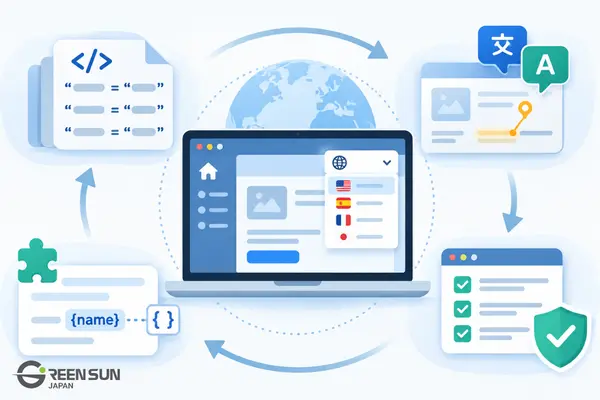
1. Preparing and Extracting UI Strings for Translation
Start by collecting the text users see or interact with, including messages that appear only in specific states. A complete inventory helps the team avoid missing content.
1.1. Identifying and Extracting UI Strings for Translation
UI strings include buttons, menus, input field labels, error messages, system notifications, and instructions. These strings may appear on main screens, in dialog boxes or forms, or when users perform specific actions.
Review each screen and feature against the source code and resource files. Look for hard-coded strings as well as text already stored in localizable resources.
According to Google’s official documentation for Android developers (Android Developers), UI strings in Android applications should be managed through resource files such as strings.xml rather than hard-coded into the source code.
Example: In an account management application, translatable content might include the “Sign in” button, the “Email address” field label, the “Incorrect password” error message, and the “Enter your verification code” instruction. The inventory should also cover error states and verification steps, not just the login screen.
1.2. Reviewing UI Strings Before Handoff
Review the extracted text for completeness, clarity, and consistent terminology. Give each string an appropriate identifier so developers can map the translation to the correct UI element.
The review should focus on the following criteria:
- Completeness: Ensure no text is missing from screens, error states, or infrequently displayed messages.
- Consistency: Use consistent terminology and wording for similar features.
- Clear identifiers: Assign recognizable string IDs and avoid unnecessary duplication.
- Translation scope: Mark strings that should not be translated, such as product names or technical codes that must remain unchanged according to project requirements.
The reviewed string list provides a foundation for adding context, helping translators understand the UI content before choosing the most appropriate wording.
2. Providing Context for Accurate UI Translations
Context tells translators what a string means and what it does. Without it, a grammatically correct translation may still describe the wrong action.
2.1. Why Do Translators Need Context for UI Strings?
Short strings are often ambiguous. A translator needs to know where the text appears and what happens when a user selects it.
Example: “Open” could be a button used to open a file or indicate the status of a support ticket. Similarly, “Close” might refer to closing a window or completing a task. Each situation requires a context-appropriate translation to avoid confusion.
2.2. What Context Should Be Provided?
Each UI string should include enough information to help translators understand how it is used, such as:
- UI location: Whether the string appears on a button, menu, heading, notification, or input field.
- Function and usage scenario: The action it describes, when it appears, and the expected outcome.
- Screenshots: Images showing where the string appears and the surrounding UI elements.
- Display constraints: Space limitations or character-length restrictions translators should consider.
Short, ambiguous strings or those used for specific functions should receive more detailed context.
2.3. How to Add Context to Localization Resource Files
Add developer comments to resource files when the format supports them, or supply notes linked to each string ID. Describe the purpose, location, and translation constraints, and include screenshots where useful.
Comments should briefly describe the string’s purpose, where it appears, and any relevant translation instructions. Screenshots can also be attached to help translators match strings to the actual interface.
Example: For the string ID account_close_button, a comment might read: “Button that closes the account settings window, not the action to delete an account.” This helps translators understand the intended action.
When the UI or its functionality changes, development teams should update the corresponding comments and context documentation to prevent translators from relying on outdated information.

3. Preserving and Validating Placeholders During Translation
In software localization, placeholders represent dynamic data, such as usernames, quantities, or values automatically inserted by the application. If placeholders are modified incorrectly during translation, messages may display inaccurate information or cause processing errors. These variables must therefore be carefully identified and validated.
3.1. Identifying and Handling Placeholders
Placeholders typically appear as {name}, {count}, or in other formats, depending on the system. These are technical elements that are replaced with actual data when the software runs.
Example: In the message “Hello, {name}!”, translators can adapt the greeting to the target language but must preserve the {name} variable exactly so the application can display the user’s name.
Development teams should explain the meaning and usage rules for each placeholder. Translators must not change variable names, characters, or syntax without authorization. However, placeholder positions may be adjusted to follow the target language’s grammar if the system supports reordering.
For strings involving quantities or singular and plural forms, appropriate formatting guidance should be provided to avoid changes in meaning.
3.2. Validating Placeholders After Translation
Placeholder validation in localization helps identify errors that could affect dynamic data. Teams should compare translated strings against the source strings using the following criteria:
- Completeness: Ensure no required placeholders are missing and no unintended placeholders have been added.
- Variable names and syntax: Preserve the exact names, characters, and formatting.
- Position within the sentence: Ensure placement follows the target language’s grammar and the software’s processing rules.
- Compatibility: Confirm that translated strings work with the application’s variable substitution mechanism.
Example: If the source string is “Welcome, {name}!” but the translation uses {username}, the application may fail to recognize the variable.
Automated checks can catch missing variables and syntax changes. Review the wording separately, then verify substitution with actual data in the test build.
4. Performing Localization QA Before Software Release
Once the translations are integrated, review them in a test build. Resource-file checks alone cannot show every language, display, or functional problem.
4.1. Testing Translations in the Application
Localization QA should be performed on a software build that includes the target language. QA teams should review key screens, interactions, and application states to ensure translations are appropriate for their intended context.
Key areas to check include translation accuracy, terminology consistency, and whether the wording matches the function of each UI element. Messages that appear only after a failed login, invalid input, or a completed action should also be tested.
Example: A “Cancel” button in a payment dialog should clearly indicate that it cancels the current action without suggesting that the entire transaction has already been canceled.
4.2. Checking Display and Functional Issues
Correct wording can still overflow a button or display incorrectly. Check the following:
| Issue Type | What to Check |
|---|---|
| Text overflow and truncation | Does text extend beyond its container or get cut off? |
| Untranslated strings | Is any source-language text or text in the wrong language still displayed? |
| Fonts and characters | Are diacritics and special characters displayed correctly? |
| Dynamic placeholders | Are variables such as {name} replaced with the correct data? |
Translations should also be tested across the screen sizes and UI states supported by the application.
4.3. Finalizing the Pre-Release QA Checklist
After testing, identified issues should be documented with their location, steps to reproduce, and severity. Development, translation, and QA teams should coordinate to resolve issues according to their respective responsibilities.
Before release, the team should confirm that:
- Critical language, display, and functional issues have been resolved.
- All fixes have been retested in the updated software build.
- Key screens and user flows meet the agreed quality criteria.
Close localization QA when fixes have been retested and any remaining issues have been assessed against the agreed release criteria.
5. Conclusion
Prepare complete strings, explain their context, protect variables, and test the localized interface. Development, translation, and QA teams each need a defined role in that process.
6. FAQ
Q1. What Context Should Be Provided for UI Strings?
UI strings should include information about where they appear, their function, usage scenarios, and screenshots when needed. For strings with limited display space, additional details about length restrictions or layout constraints should be provided to help translators choose appropriate wording.
Q2. Who Is Responsible for Validating Placeholders Such as {name}?
Placeholder validation is a shared responsibility. Developers define variable syntax and processing rules, translators preserve placeholders in translated strings, and QA testers verify that variables are correctly replaced with actual data and displayed properly in the application.
Q3. Is It Necessary to Test Translations Directly in the Application Before Release?
Yes. Reviewing translations in resource files alone cannot identify every issue. Localization QA on a software build helps detect problems such as incorrect translations in context, truncated text, font issues, untranslated strings, or placeholders that do not function correctly.
Q4. When Should Localization QA Be Performed During Software Development?
Localization QA should be performed after translations have been integrated into a testable software build and before release. If related UI elements, content, or functionality changes, QA teams should retest the affected areas to minimize potential issues.
Preparing a multilingual software release? Share your string files, screenshots, and test requirements with Green Sun Japan to discuss the localization workflow.
Make sure all UI strings are collected, translation context is clearly documented, and translations are thoroughly tested before release.
Contact Green Sun Japan to discuss software localization solutions tailored to your product.