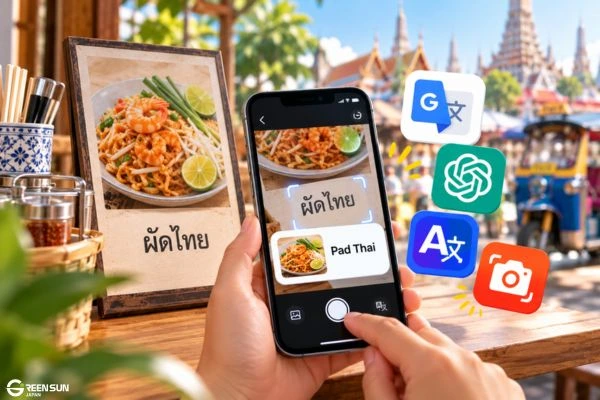
Thai translator apps face a practical challenge: Thai words are generally written without spaces between them, and restaurant menus often use fonts that look very different from textbook Thai.
Many travelers have experienced frustrating situations, such as pointing a camera at a menu only to get a string of meaningless words or using voice translation with a taxi driver who still struggles to understand the result. This guide explains how to choose a Thai translator app for real-life situations you are likely to encounter while traveling in Thailand.
📌 Key Takeaways / Direct Answer
- No single app does everything perfectly: Use different tools for different situations. Google Lens can help scan stylized menu text, while ChatGPT Voice or Apple Translate can support spoken conversations. Before traveling, download an offline Thai translation app or Thai language pack as a backup when you do not have an internet connection.
- Best free all-around option: Google Translate remains one of the most practical free Thai translator apps for independent travelers, combining text, voice, image, and offline translation features.
- Watch out for loopless Thai fonts: Many cafés and restaurants use modern Thai typefaces that remove the traditional loops found in many Thai characters. When recognition fails, taking a clear, close-up photo may work better than relying on continuous live-camera translation.
- Add Thai polite particles yourself: Automatic translations may not always produce the appropriate level of politeness for the situation. When speaking, adding khrap if you are male or kha if you are female at the end of a sentence can make your speech more polite.
- Know the limits for business use: Do not rely solely on automatic translation apps for commercial lease agreements, business registration documents, contracts, or other legal documents used in Thailand.

1. Which Thai Translation App Works Best in Real-Life Situations?
Choose apps based on the situations you expect to encounter in Thailand.
| Real-Life Situation in Thailand | Common Challenge | Tools to Consider | Practical Tip |
|---|---|---|---|
| Reading restaurant menus and street food signs | Handwritten Thai or stylized loopless fonts can be difficult for camera translation tools to recognize accurately. | Google Lens / Google Translate Camera | Take a clear, close-up photo instead of relying only on live-camera translation. Then select smaller sections of text one at a time. |
| Bargaining at Chatuchak or Pratunam Market | Busy markets are noisy, so you need fast speech recognition and clear audio playback. | ChatGPT Voice Mode / Apple Translate | Prepare a few price-related phrases in advance and add polite particles such as khrap or kha when speaking. |
| Traveling on the Chao Phraya River with weak 4G coverage | Mobile data may be unstable or unavailable. | Apple Translate (iOS) / Google Translate Offline Language Pack | Download Thai for offline use before your trip. An offline Thai translation app works best for short phrases and basic communication. |
| Messaging business partners or hotels | Thai is not written with spaces between every word, so machine translation may segment a sentence incorrectly and change the intended meaning. | DeepL Translate | Paste the full sentence or paragraph instead of translating separate lines so the app has more context to work with. |
2. How to Handle Two Common Thai Language Challenges When Using Translation Apps
2.1. Watch Out for Loopless Thai Fonts on Modern Signs
Many shopping mall signs, café menus, and modern displays in Bangkok use stylized Thai fonts that remove the small loops traditionally found in many Thai characters. Visually, the difference is somewhat similar to the distinction between serif and sans-serif typefaces in Western typography.
- The challenge: Older translation or OCR tools may struggle to recognize highly stylized Thai text, especially when the font differs significantly from traditional printed Thai.
- What to do: Try Google Lens or supported text-recognition features on your device. Results vary with the font and image quality. For more accurate recognition, take a clear photo, keep the camera as straight as possible, and make sure the text is well lit.
2.2. Add “Khrap” or “Kha” for More Polite Communication
Politeness plays an important role in everyday communication in Thailand.
- If you are male: Add khrap (ครับ) at the end of the sentence.
- If you are female: Add kha (ค่ะ/คะ) where appropriate.
When using a voice translation app with a taxi driver, market vendor, or restaurant staff member, the translated sentence may sound overly direct—for example, “How much is this?” or “Go to Silom Road.”
Adding khrap or kha when speaking can make the sentence sound more polite and natural. This small adjustment can help conversations go more smoothly, especially when asking about prices, requesting directions, or asking for assistance.
3. Three Business Situations Where Translation Apps Should Not Be Used Alone
Mobile translation apps are extremely useful for travel and everyday communication. However, relying on them for formal business transactions in Thailand can create serious risks, especially when wording, terminology, or legal meaning must be precise.
- Agency agreements and commercial lease contracts: Business and property agreements often contain detailed conditions covering deposits, repayment obligations, exclusions, and liability. Machine translation may misinterpret or incorrectly break apart conditional clauses, potentially changing the intended meaning and creating problems if a dispute arises.
- Trademark applications and Thai FDA documentation: Product names, active ingredients, measurement standards, and required product information must follow the terminology and formatting expected by local authorities. These documents should not rely solely on automatic translation.
- Marketing and advertising content: Thai advertising often uses humor, emotional tone, wordplay, and culturally specific expressions. Machine translation can flatten these elements and make a brand message sound generic, awkward, or disconnected from the local audience.
4. Conclusion
Thai translator apps are highly practical tools for everyday travel, whether you are ordering street food, asking for directions, shopping, or handling basic conversations in Thailand. Preparing an offline Thai translation app in advance and using polite particles such as khrap or kha can make these interactions smoother and more natural.
For commercial transactions, technical documents, legal contracts, and official submissions, however, translation quality depends on more than conveying the basic meaning. Accurate terminology, context, and wording should be reviewed by language professionals to reduce the risk of misunderstandings and help businesses use translated content with greater confidence.
Professional Thai Localization Solutions with Green Sun Japan
If your project goes beyond basic travel communication and requires accurate, business-ready content for the Thai market, professional localization becomes essential.
Green Sun Japan helps businesses reduce language barriers through a structured translation and localization process designed for professional use:
- 🇹🇭 Thai typography and DTP support: Native-language specialists handle Thai text layout across design files, brochures, and websites, helping prevent incorrect line breaks and other formatting issues that can affect readability.
- 📋 Consistent B2B terminology management: Legal, technical, and industry-specific terminology can be standardized through dedicated glossaries to improve consistency across contracts, corporate documents, and other business materials.
- ⚡ Fast quotation response: Receive an initial response within 30 minutes, supported by a three-step quality control process, cost-conscious project planning, and NDA-based confidentiality when required.
👉 Contact Green Sun Japan to share a sample document and discuss the most suitable Thai translation and localization approach for your project.
5. Frequently Asked Questions (FAQ)
Q1. If I only install one Thai translation app for my trip, which one should I choose?
Google Translate is the most practical all-around option for most travelers. It combines camera translation for menus and signs, two-way voice conversations, and downloadable language packs for basic offline use.
Q2. Can I still use camera translation after downloading Thai for offline use?
Yes, but performance may be more limited than when you have an internet connection. Offline translation works best with clear, well-printed text and may be less reliable with long, complex, or highly stylized Thai content.
Q3. Is there an app that handles Thai slang or youth language well?
Generative AI tools such as ChatGPT or Gemini can be useful for slang, casual expressions, and conversational Thai because they can interpret more context than traditional word-for-word translation apps. However, the output should still be checked when accuracy matters.
Q4. How can I scan Thai text on a menu more accurately?
Take a clear, well-lit photo instead of relying only on live-camera translation. Then open the image in the app and select a smaller phrase or section of text. This can improve recognition accuracy and reduce segmentation errors.